Telegram · 10 min read · from the video
Build a Telegram support bot in n8n that hands off to a human
A bot that answers from your own notes, knows when a message should be yours, and goes quiet until you hand it back.
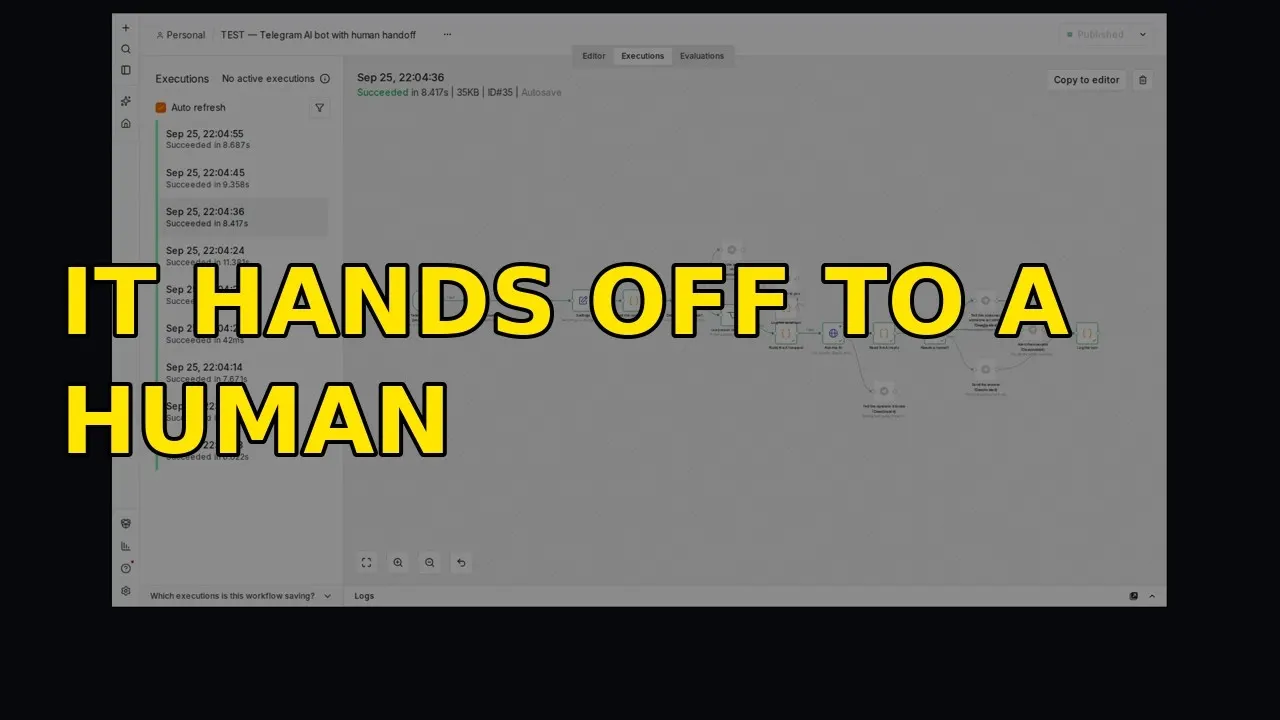
A customer writes to your Telegram bot: their bag arrived damaged and they want a refund. This bot does not answer that. It tells the customer a person is coming, and it goes quiet. At the same moment, you get a message with the whole conversation, the reason it stopped, and the reply it nearly sent.
This post is the written version of the video above. It covers how the bot decides to hand off, the notes it answers from, the n8n workflow node by node, the real saved runs (including the one that failed in testing), and how you hand a chat back.
Why a support bot needs a way to hand off to a human
An AI is good at the routine questions. How long does delivery take. Do you open on Sundays. What is your returns policy. Those are the questions you answer late at night, over and over, and a bot should take them off you.
The same model that answers those well will also answer the questions it should not. Ask it about a refund and it may invent a refund policy. Ask whether you have a bag in green and it may guess. A bot that makes up your returns policy costs you more than a bot that says “let me get someone”.
So this workflow is built around one decision, made on every message: can I answer this from what I have been told, or should a person have it?
If it can answer, it answers and logs the turn. If it should not, it stops, tells the customer someone is coming, and alerts you. Once you have the chat, the bot stays out of it until you give it back.
When the bot hands off
The bot hands the chat to you when any of these is true:
- the customer asks for a person, an agent or a manager
- the message is about one of your escalate topics, such as refunds, complaints or billing
- the customer is angry or upset
- the answer is not in your notes, so answering would mean guessing
The last reason matters most. A wrong answer about your own policy is worse than a short wait for a person.
The notes it answers from, and only from
Everything you set up lives in one n8n node called Settings. You never have to open the code.
The most important field is the knowledge field. It is a list of facts, one per line. Short and flat beats clever:
We ship to the UK and the EU. We do not ship outside the EU.
Standard delivery is 3 to 5 days, tracked. Express is next working day.
Returns: 30 days, unused, buyer pays return postage.
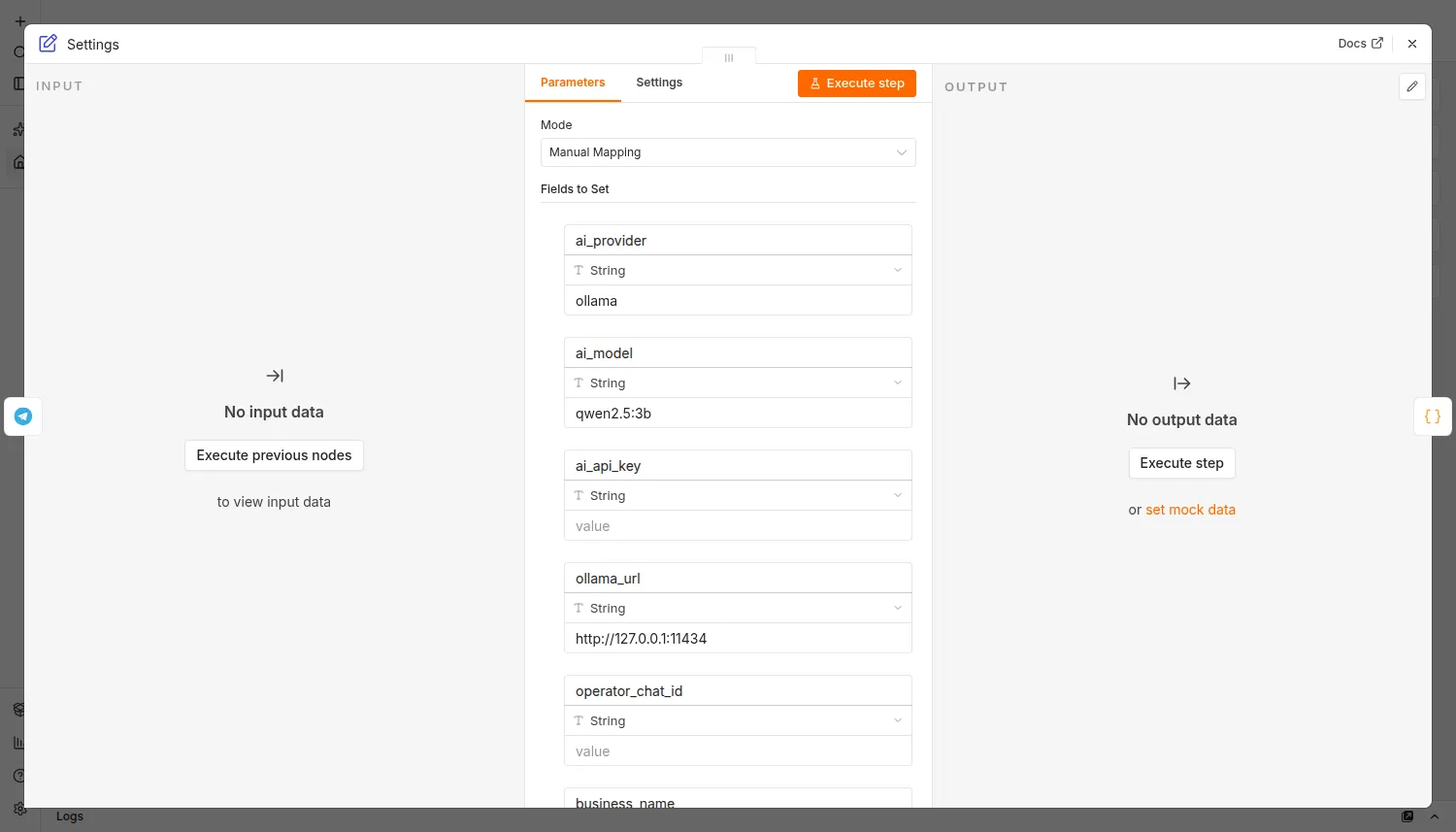
The bot may state those facts and nothing else. If a customer asks something those lines do not cover, it hands over instead of guessing. Teaching the bot is adding a line. There is nothing to train and no documents to upload. The shorter and truer the list, the better the bot behaves.
Three other fields sit next to it:
- The escalate list. A plain list of topics you always want to handle yourself. In the demo shop it is refunds, cancellations, complaints, damaged goods and billing.
- The handoff message. The exact sentence the customer sees when a person is being fetched. The model never writes it, so it can never promise something you would not.
- The resume command. What you type to give a chat back to the bot. By default it is /resume.
The n8n workflow, node by node
A node in n8n is one step, and the lines between nodes are the order things happen in. Here is the path a message takes.
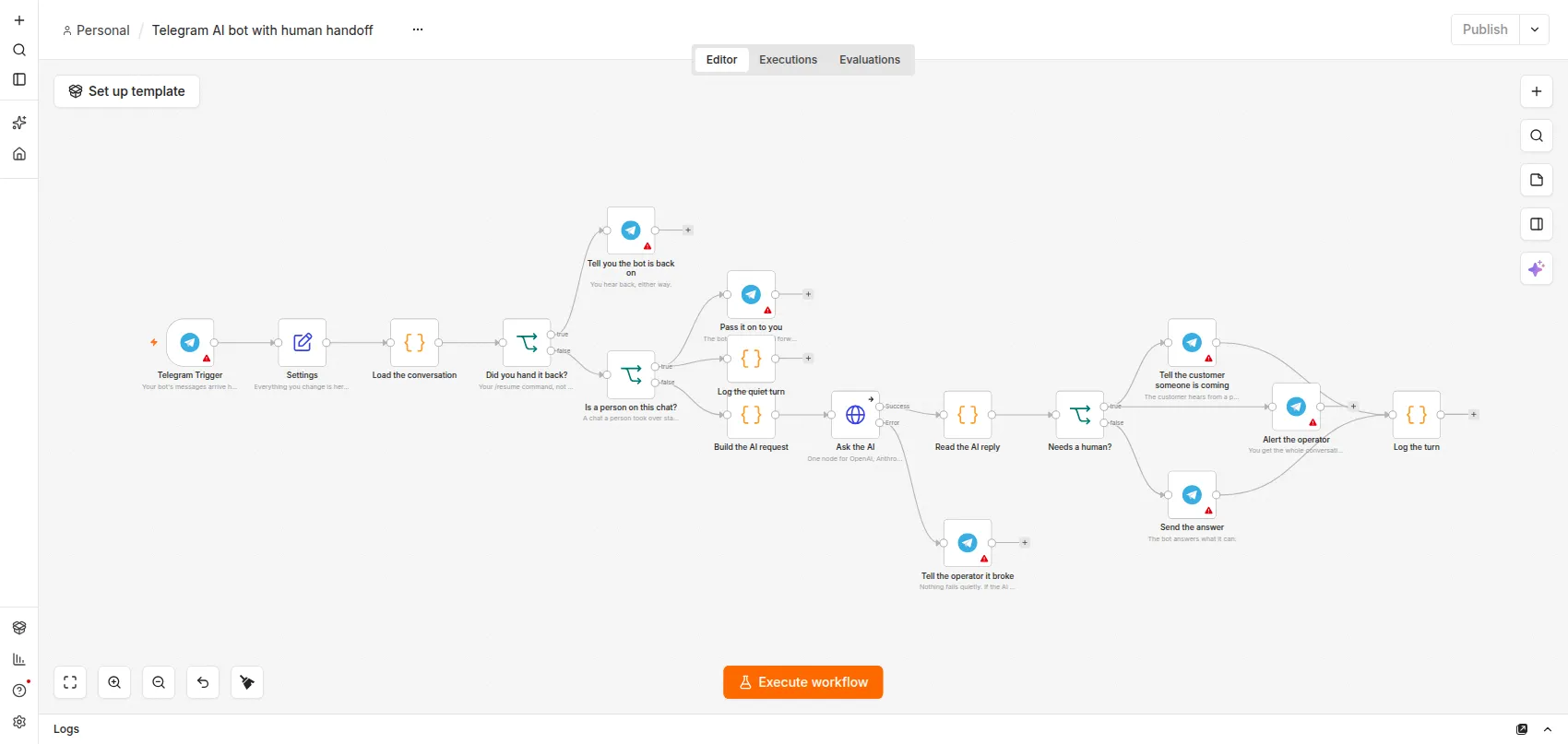
- Telegram trigger. Every message a customer sends your bot arrives here.
- Settings. Hands your notes and your lists to everything after it.
- Load the conversation. The bot remembers the last few turns of each chat, so it can tell a follow-up question from a new one.
- Check one: did you just hand this chat back? If so, it clears the handover and carries on as normal.
- Check two: is a person already on this chat? If you have it, the message goes straight to you and the AI is never called. That costs nothing and cannot go wrong.
- Build the request. Only if nobody has the chat. The request carries your notes, your escalate list, the recent conversation and the new message.
- The AI step. One node that talks to Ollama on your own machine, or to OpenAI, or to Anthropic. You switch between them with one field in Settings.
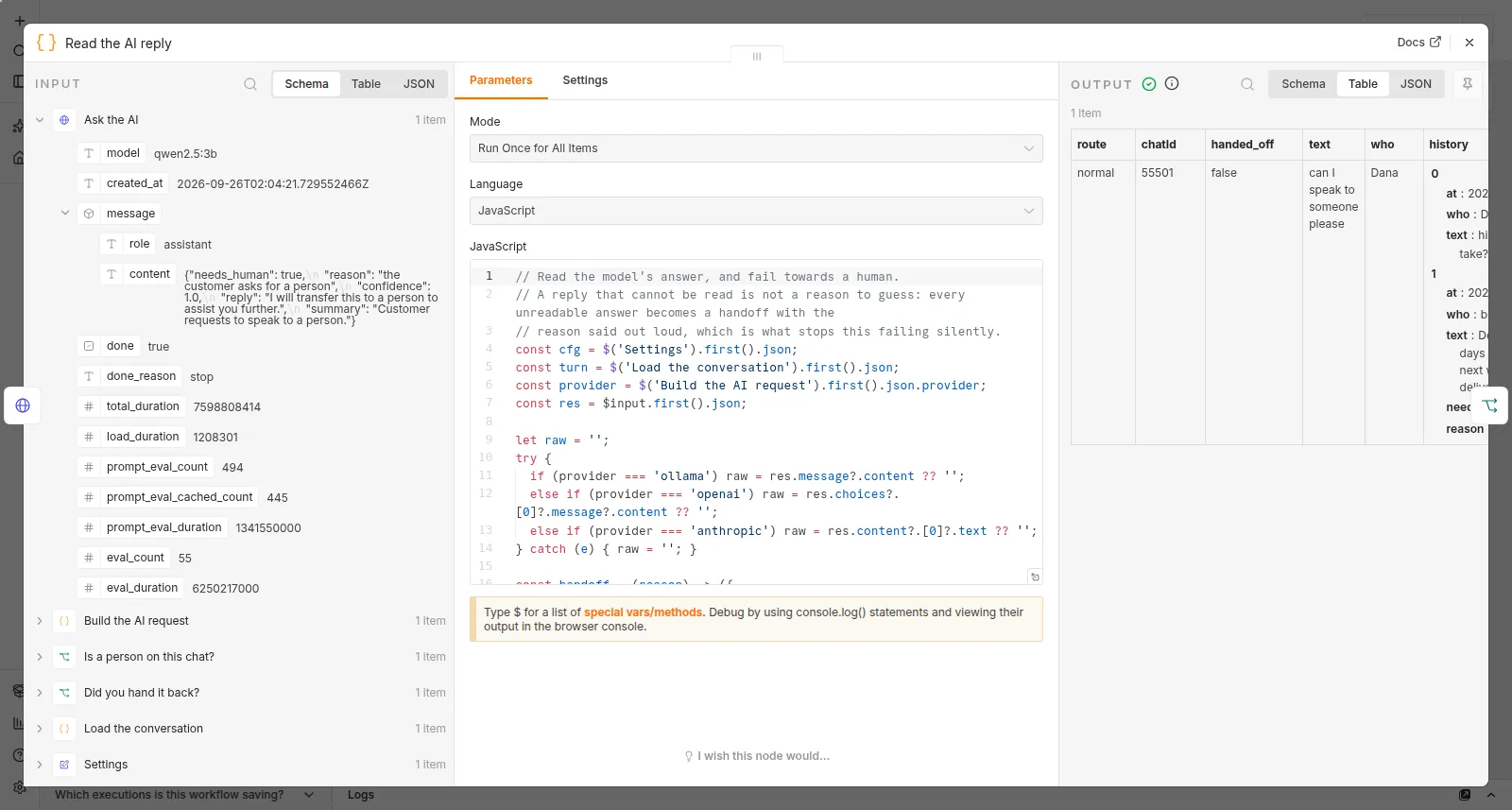
- Read the reply. The AI has to answer in a fixed shape: an answer, and a yes or no on whether a human is needed, with a reason. This node checks the reply has that shape. If the AI sends back something it cannot read, that counts as needing a human too.
- The fork. If no human is needed, the answer goes to the customer and the turn is logged. If a human is needed, two things happen in this order: you get the alert, then the customer gets your handoff message. The order matters, and the failure section below explains why.
Both checks in steps 4 and 5 run before the AI is asked anything.
What the operator alert contains
When the bot hands off, your alert on Telegram has the customer’s name, the reason it stopped, what they said, the conversation so far, and the answer the bot wanted to send but did not. It ends with the exact /resume command for that chat, so you do not have to remember it.
The bot’s draft is shown to you, never to the customer. An answer that invents a refund policy costs you nothing, because the customer only ever gets your words.
Four handoffs on real runs
These are saved n8n executions, run against a small local model.
The routine one first. Dana asks how long delivery takes. The notes say 3 to 5 days standard and next working day express, and that is what she gets. No person involved.
Then Dana writes again: “can I speak to someone please”. That is a handoff, and the reason given is that the customer asked for a person. Her first message was carried along, so whoever picks it up sees the whole conversation.
Rob writes: “my bag arrived damaged and I want a refund”. It hands off. The reason it records is that the customer is upset, and refunds and damaged goods are on the escalate list anyway, so this one was never the bot’s to answer.
Priya writes: “third time I have asked. absolutely useless.” There is no fact in the notes about this. What makes it a handoff is the tone, and the reason says the customer is angry.
Marco asks: “do you have these in green?” The notes do not say what colours there are. A bot that answers everything might guess, and might say yes. This one hands off, because the answer is not in the notes.
Four different reasons to stop: a request for a person, an upset customer with a refund, an angry customer, and a fact the bot does not have. In every case the customer hears your sentence, not the model’s.
While a person has the chat
Once a chat is handed over, the bot stops answering that customer. In the saved run, Dana sends one more message while a person has her chat: “and are they open on Sunday?”
The bot stays quiet, even though that is the kind of question it could answer. Her message is forwarded to you and logged, and the AI is never called.
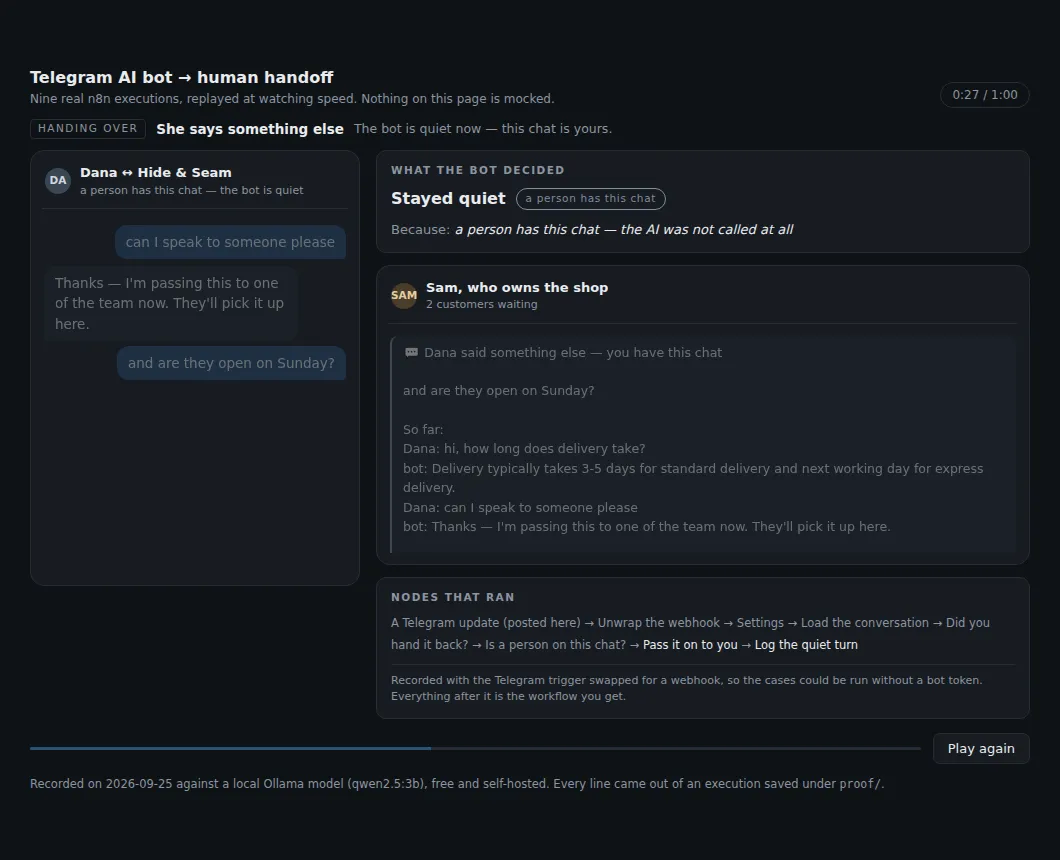
Once a person is talking to a customer, a bot cutting in with its own answer is the worst thing it could do.
If you never send /resume, the bot stays quiet with that one customer and keeps forwarding. No other conversation is affected.
Handing the chat back with /resume
When you are done, send /resume followed by the chat id from the alert. The bot confirms it has that chat again, and from the next message everything is judged normally.
In the run after the handback, Dana asks what the return window is. The bot looks at the message fresh rather than assuming you are still there. It handed that one off too, as a returns question, and refunds and cancellations are on the demo shop’s escalate list.
The day an alert got lost in testing
When the workflow was tested against the real Telegram API, a message to the bot asked to speak to someone. The bot made the right call. It handed off, and the customer was sent the holding message.
Then the alert to the operator failed. One dropped connection to Telegram’s servers, and the message saying a customer needs you never arrived. The chat was marked as handed over, the customer had been promised a person, and the person was never told. That is the exact failure this template exists to prevent, and it happened in testing.
Two things changed because of it:
- Every Telegram step now retries: three tries, two seconds apart. Telegram drops a connection now and then, and a send that only tries once will eventually lose the one that matters.
- The alert to you now goes out before the message to the customer. If only one of the two gets through, it has to be yours. A customer holding a promise nobody heard about is stranded. An operator who hears about it can simply reply.
One thing to know if you edit the workflow. In n8n, two branches that start from the same step run in canvas order, top to bottom, not in the order the connections are listed. Moving the alert node higher on the canvas is what actually changed the order. The node positions matter.
The same four cases were re-run afterwards, and the alert now goes first in a real run. The lost run is kept in the proof folder under its own name, so the reason for the retry setting can be checked.
If the AI itself is down, the bot does not go silent either. It stops answering customers and sends you a message saying it broke, with the error.
What it gets wrong with a small free model
All of the runs above used a small local model: Ollama running qwen2.5:3b, which costs nothing.
It slipped on Nadia’s question. She asked “do you ship to Australia?” The notes say the shop ships to the UK and the EU and not outside it, so “no” is the answer, and the bot should have said so. The small model handed it to a person instead, reasoning that Australia was not covered.
That case is left in the proof on purpose. A small free model errs toward fetching a person, and for this job that is the safe direction to be wrong in: you get an unnecessary alert, not a customer told something false. If you want fewer of those, a bigger model is one field away in Settings. OpenAI or Anthropic will be less cautious, and you pay their price per message instead. Only the Ollama path was run in testing; the OpenAI and Anthropic branches are built from each provider’s documented request shape.
Running it for free, and the ten minute setup
The template runs on n8n’s free self-hosted edition, and on Ollama the AI is free too.
Setup is about ten minutes:
- Import the workflow into n8n.
- Make a bot with @BotFather on Telegram and paste its token into the Telegram credential once.
- Get your own Telegram chat id, so the bot can reach you with alerts.
- Fill in the Settings node: your notes, your escalate list, your handoff message and your AI provider.
- Switch the workflow on and test it from your own Telegram.
One thing people miss: message your own bot once before you switch it on. A Telegram bot cannot start a conversation with you, so until you have spoken to it, its alerts have nowhere to go.
What this template does not do
- It does not take payments, make bookings or look anything up in your shop or CRM. It answers from your notes and fetches you for everything else.
- It replies to text messages only. Not voice notes, photos or documents.
- It does not notice when you reply to the customer yourself, because Telegram does not tell it. You end a handoff with /resume.
- It cannot message a customer first. Telegram does not allow that for any bot.
Build it yourself, or start from the template
If you want to build this yourself, the design is everything above: the notes, the two checks before the AI, the fixed reply shape, and the alert before the holding message.
If you would rather start from a working template, the free version answers your customers on Telegram from notes you write, and when it cannot answer, the customer gets your own holding sentence. The full version is the one in the video: the handoff, the operator alert, the quiet period while you have the chat, and /resume. It comes with the setup guide and the nine saved conversation runs, including the run the model got wrong.
Your support bot should answer the routine questions, and know when to stop talking.